I've been experimenting with what it actually looks like to design and ship products with AI tools in the loop. I didn't want to build a generic SaaS dashboard; I wanted to build something with real, hostile browser constraints.
So, I started building a project called StreamFM.
The product vision is simple: Think Twitch, but for streaming your music taste. You press go live, play music, and people tune in to your stream while you physically control the vibe with lightweight DJ-style tools.
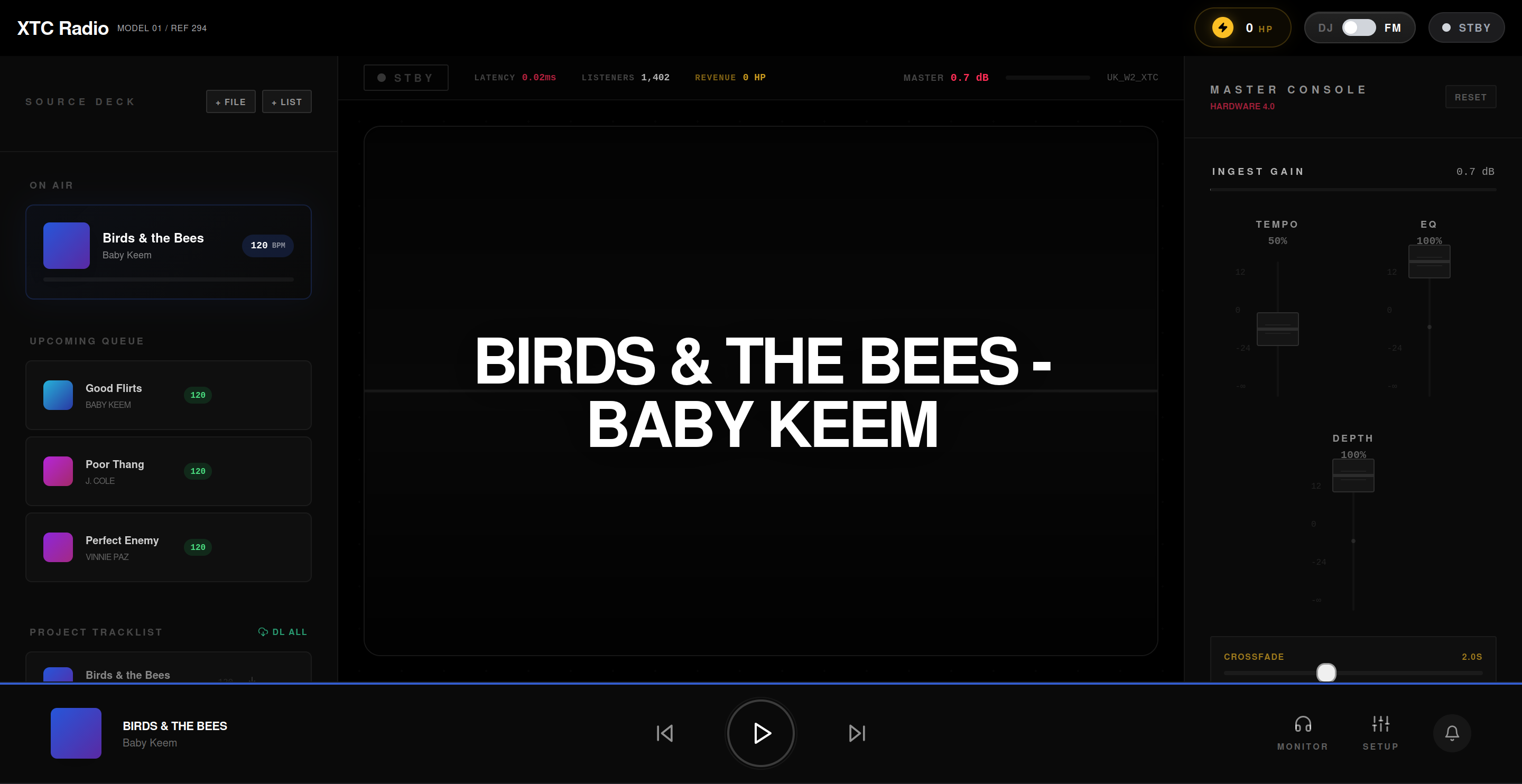
Using AI orchestration, I moved from idea to an initial interface incredibly fast. Designing the slick, glassmorphic CSS animations and bringing that premium "pretty UI" to life was pure developer delight.
But the backend audio engine? That was a descent into an engineering hellscape.
If you are thinking about building a professional-grade web audio application, let this be a warning. Building a UI that looks like a music player is easy. Building a real-time engine that actually plays audio seamlessly across disparate sources? That is a roller coaster of pain.
Here is the technical reality of what went right, what went spectacularly wrong, and how shifting from writing lines of code to orchestrating AI agents saved the architecture.
0. The Orchestration Workflow
Before diving into the bugs, we have to talk about how this was built.
I didn't just use an LLM as a glorified autocomplete. I set up my AI agents to act as specialized team members: an Engineering Manager, a UX Architect, and a CEO.
When the audio engine catastrophically failed (which it did often), I didn't paste a stack trace and ask "fix this." I ran the @[/plan-eng-review] workflow. The agent audited the architecture, analyzed the coupling between React and the Web Audio API, built an error map, and proposed three concrete structural refactors with associated trade-offs.
I treated the agents as Principal Engineers, and that workflow is the only reason the project survived the complexity.
1. The Native vs. Iframe War: The Hybrid Engine
To deliver on the "Twitch for Music" vision, we needed professional DJ controls. We needed a dual-player architecture (Deck A / Deck B) to allow for seamless, zero-latency crossfading between tracks. You can't have a 400ms dead-air gap during a live mix.
But I didn't just want to play local MP3s; I wanted users to import playlists and resolve them against streaming platforms.
Do you know what the browser hates? You trying to unify a native HTML5 <audio> element with a sandboxed YouTube <iframe>.
To process effects (EQ, depth/reverb, mic ducking), we needed to route all audio through a unified Web Audio API graph:
[ Deck A: Blob URL ] ---> [ Gain Node A ] ──┐
                                            │──> [ Master Crossfader ] ──> [ Master Out ]
[ Deck B: YouTube ] ----> [ Gain Node B ] ──┘
The Struggle: You cannot extract raw audio buffers from a YouTube iframe due to strict CORS policies. While I could execute mathematically perfect crossfades on native HTML5 streams using Web Audio's linearRampToValueAtTime, the YouTube player was a black box.
I had to brutally simulate the crossfade by manually stepping the React wrapper's volume prop over 20 discrete intervals in a setInterval loop. When building a product where the core value is "vibes," writing code that intentionally sounds a bit choppy is deeply frustrating.
2. React vs. Web Audio: A Tale of Two Paradigms Trying to Kill Each Other
React is declarative and reactive. The Web Audio API is imperative and stateful. These two paradigms fundamentally despise each other.
Whenever the global state updated—like the user adjusting the BPM fader or triggering a UI animation—React did what React does: it re-rendered the tree.
Suddenly, my audio nodes were garbage collected. The music would stutter, clip, or outright stop. I spent days chasing a bug where the music died entirely just because a user opened a dropdown menu.
The Architectural Fix: The stateRef Pattern
This is where treating my AI agents as Principal Architects paid off. We realized you absolutely cannot store transient audio state in React state (useState). It is a death sentence for performance.
We had to completely decouple the Audio Engine from the React lifecycle. We moved almost the entire Web Audio context, the GainNodes, and the DOM element references into a web of useRef hooks. To keep the UI in sync without breaking the audio, we codified the stateRef pattern—a silent shadow-copy of state that the audio event listeners could read synchronously without ever triggering a closure staleness bug.
Of course, breaking the rules of React means you are entirely responsible for manual garbage collection via useEffect cleanup blocks—otherwise, you'll leak memory until the tab crashes. But the trade-off is zero audio clipping.
This pattern alone is valuable IP unlocked by the pain of this project.
3. The CORS Collapse and the Empty String Bug
Because streaming platforms actively fight third-party clients, my AI backend agent designed a local ingestion pipeline to solve latency. We used a self-hosted Cobalt instance to extract high-quality audio blobs and store them directly in the browser using IndexedDB (successfully caching over 50GB of music locally).
Loading from IndexedDB via URL.createObjectURL(blob) is incredibly fast! But the browser security model had other plans.
The "SecurityError: The operation is insecure" Collapse
I had hardcoded crossorigin="anonymous" onto my audio players to allow the Web Audio API to process remote streams. But the moment I tried to feed it a local blob URL, Chrome threw a fatal security exception and crashed the player. My agent had to write an aggressive AST mutation to strip the crossorigin attribute from the DOM element microseconds before calling .play().
The Silent Killer: "".includes("")
Perhaps the most embarrassing bug was in our deduplication engine. Sometimes, imported Spotify tracks lacked a resolved raw URL during the initial load cycle.
Because we were moving so fast to prototype the initial UI, we relied heavily on loosely typed JavaScript inferences rather than strict TypeScript guardrails. If track.url was an empty string, "".includes("") evaluates to true.
The app confidently believed it was currently playing every single un-loaded song in existence, and promptly halted all playback. The entire application ground to a halt because of a missing truthiness check.
Building In Public
Building StreamFM has been an exercise in absolute stubbornness. The browser was never meant to be a Digital Audio Workstation, and it fights you every single step of the way.
But this workflow—using specialized AI agents to establish architectural boundaries, design glassmorphic UIs, and perform ruthless code reviews when the browser pushes back—is an incredible multiplier. StreamFM is a trojan horse; the real product is the patterns we are discovering to build real-time reactive engines in the browser.
I'm taking a break tonight to regain my sanity. But I'll be back at it this weekend. I am currently architecting a WebRTC broadcasting layer so users can stream their local "Studio" mix peer-to-peer to listeners in real-time.
It's going to be a completely different kind of nightmare, and I can't wait.
Next week, I'll be publishing the open-source snippet for the stateRef pattern that saved this project. Subscribe to get it before I break the WebRTC layer, and follow along as I continue building StreamFM in public.
Margin Notes
Drop your email to get the open-source stateRef snippet next week before I break the WebRTC layer.